What does it do?
Microsoft ships a PST repair tool called ScanPST.exe with every version of Outlook. It works, but it only repairs one file at a time — and a damaged PST often needs multiple repair passes before it comes back clean.
ScanPSTAll automates this entirely. It finds ScanPST.exe on your system automatically, loops through all the PST files you point it at, and keeps running repair passes on each file until it gets a clean result. You set the maximum number of attempts per file, and ScanPSTAll handles the rest.
Results are logged so you can see which files needed repair and how many passes it took.
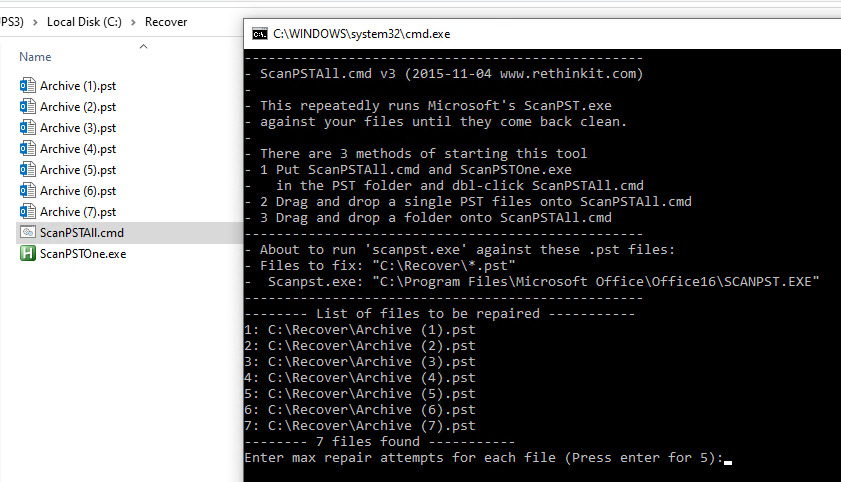
Three ways to run it
Same folder
Place ScanPSTAll.cmd and ScanPSTOne.exe in the folder containing your PST files, then double-click ScanPSTAll.cmd.
Single file
Drag and drop a single .pst file onto ScanPSTAll.cmd to repair just that one file.
Entire folder
Drag and drop a folder onto ScanPSTAll.cmd to repair all .pst files inside it.
What's in the download
The zip contains two files: ScanPSTAll.cmd (the batch script that drives the process) and ScanPSTOne.exe (a small helper that calls ScanPST.exe and returns a result code). Both files must be kept together.
Requirements: Windows with Microsoft Outlook installed. ScanPSTAll locates ScanPST.exe automatically via the registry — no configuration needed. A log file is created in the same directory and opened automatically when the run completes.