What does it do?
Outlook stores all of its data in .pst files — one per root-level mailbox. When users accumulate years of email, these files grow unwieldy. MailScavator lets you take a collection of PST files and split them neatly by date or size, so instead of one massive archive you end up with organized files like JSmith 2019.pst, JSmith 2020.pst, and so on.
The first tab also works as a standalone Outlook Profile PST manager — you can add or remove PSTs in bulk using shift-select.
Features
Split by Date
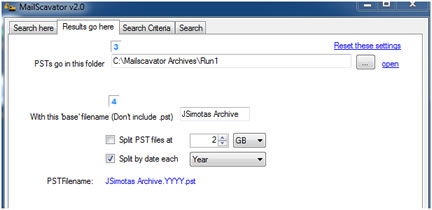
Divide a PST into separate files by Year, Quarter, or Month. Clean, predictable output file names.
Split by Size
Break large PSTs into equal-sized chunks — part1, part2, etc. Useful before migrating archives.
Powerful Filtering
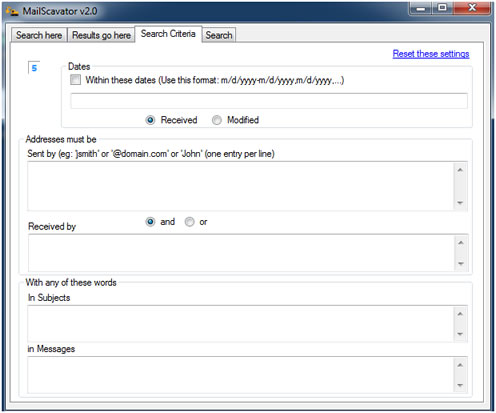
Only process a subset of your mail using MailScavator's filtering options — by date range, sender, or other criteria.
Address & Day Stats
Collect statistics on all unique email addresses and message days found in the archive. Results export to XML for analysis in Excel.
Move, Copy, or Scan
Default operation is Move. Use Copy to keep the originals intact, or Scan to collect stats without touching the data.
Bulk PST Management
Add multiple PST files at once using shift-select directly from the first tab — great for managing an Outlook profile.
About .pst files: Outlook uses .pst files to store all of its data. Each root-level mailbox on the left side of Outlook represents a single .pst file. Right-click → Properties on any mailbox will show you the path to its .pst file.
Screenshots
MailScavator v2.9 in action.
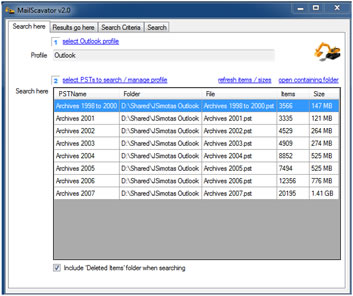
The first tab doubles as an Outlook Profile PST manager. Add multiple PSTs at once with shift-select, remove PSTs, and set split options by date or size.
Powerful filtering — use this if you only want a subset of your mail to be processed.
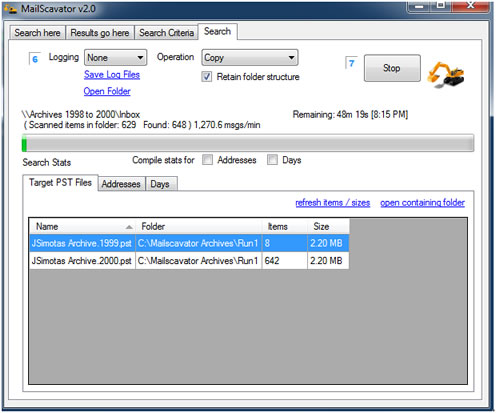
Check the Addresses box to collect stats on all unique addresses and days found. Results are logged to XML files you can open in Excel.