What does it do?
DiskJanitor is a disk groomer. You tell it which folders to scan and which file patterns to look for, and it either deletes those files or moves them to another folder — preserving the original directory structure. It's ideal for cleaning up temp files, old logs, or any category of file that accumulates over time.
How to use it
-
1
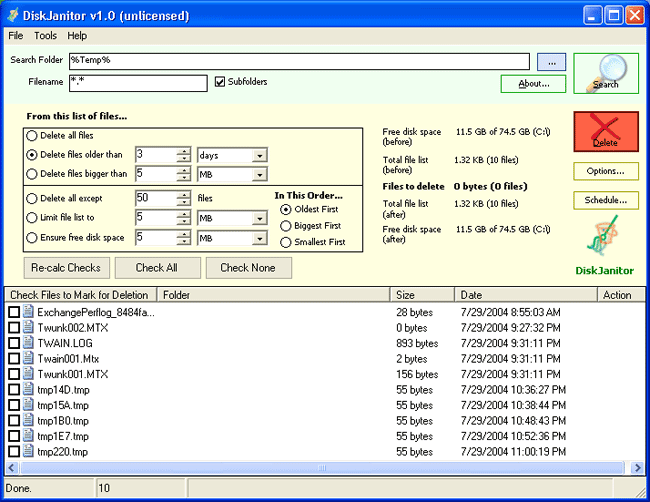
Set a folder path. This is where DiskJanitor will search. Separate multiple paths with a semicolon. Environment variables are supported — e.g.
%temp%;%systemroot%\system32\ -
2
Enter filenames to match. Separate multiple entries with a semicolon. Standard wildcards are supported — e.g.
*.tmp;*.log -
3
Press Search to see a list of matched files before anything is deleted.
-
4
Set filters — for example, only delete files older than 3 days. If multiple drives are specified, make sure disk space is calculated per drive.
-
5
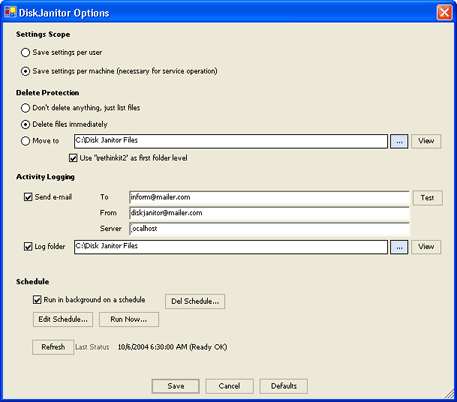
Review Options. The first time you run it, choose Don't delete anything, just list files to do a dry run and review the log.
-
6
Press Delete. All actions are logged to file for your records.
Scheduling
DiskJanitor can be scheduled to run silently in the background on a recurring basis. Configure your settings first, then use the Scheduling option to set it up as a Windows scheduled task.
Note: You must supply a Windows account with permission to delete the target files. If the account password changes, the scheduled task will stop working until updated.
Screenshots
Main screen and Options area from DiskJanitor v1.5.